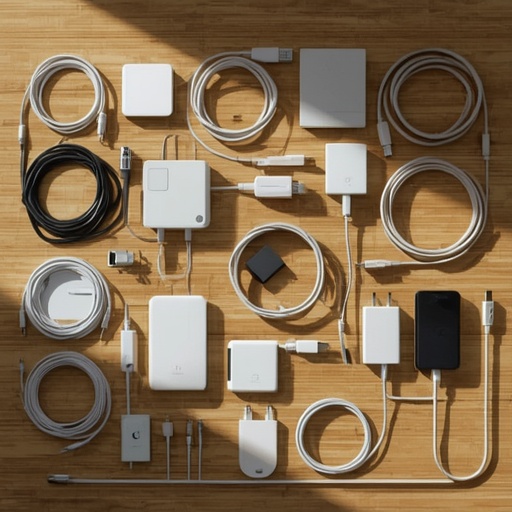
For years, there has been an ongoing jest among those of us immersed in the world of technology and electronic gadgets—a recognition that we, perhaps more than we’d like to admit, have amassed an excessive amount of technological clutter. This accumulation often takes the form of overflowing boxes filled with tangled cables, outdated connectors, and miscellaneous adapters whose original devices may have long since disappeared. Yet, for reasons that defy strict logic but resonate with every self-proclaimed tech enthusiast, we cling to these relics like lifelines. We convince ourselves with that familiar refrain: “It’ll come in handy one day.” Of course, months—more likely years—pass, and the hypothetical “one day” still refuses to arrive. Still, the haunting possibility that someone might suddenly need an obscure VGA-to-HDMI converter—perhaps, as humorously imagined, a neighbor’s catsitter on some future afternoon—prevents us from letting go entirely.
Lately, however, I’ve found myself moving through a personal stage of intentional simplification. While I’m far from reaching the tranquil minimalism or balanced harmony that practitioners of Feng Shui might aspire to, I have begun paring down the quantity of physical items in my life, including that intimidating assortment of technological odds and ends. The latest target of scrutiny? My labyrinthine collection of cables, dongles, and adapters that have somehow multiplied over the years.
Now, as I carefully load various disused electronics into boxes destined for my local recycling center—where the playful “seagulls” of refuse management will deal with them—I’m reminded that certain cords and connectors merit preservation. Not because I anticipate a rare, absurd scenario involving a missing adapter in a friend-of-a-friend’s emergency, but because many of these tools, though seemingly obsolete, remain functionally valuable. Age, after all, does not inherently dictate uselessness. Some artifacts of older technology still perform tasks that newer devices cannot replace perfectly, and that is reason enough to grant them continued shelf space.
Take, for instance, the humble USB-A-to-USB-C cable. When USB-C arrived, experts heralded it as the universal connector that would unify and simplify the digital world—one cable and charger for every device. Yet, the reality proved more complex. Some gadgets equipped with a USB-C port simply refuse to charge when paired with a USB-C-to-USB-C cable and a modern USB-C charger. The culprit often lies in a missing piece of circuitry incapable of signaling the charger to activate. The surest sign of this problem appears when a device includes, right out of the box, a USB-A-to-USB-C cable: a quiet admission that a traditional connection may still be required. Hence, it’s wise to keep one of these older cables—and a compatible charger—handy.
Another survivor in this evolutionary ecosystem is the microUSB cable. Although widely regarded as finicky and prone to loosening or breaking, it refuses to fade quietly into obsolescence. Countless inexpensive gadgets—from affordable power banks found on Temu or eBay to small-scale electronics like LED lights or Bluetooth accessories—still rely on this older interface. Having at least one sturdy USB-A-to-microUSB cable around can therefore save considerable annoyance when a seldom-used but necessary device resurfaces.
Power cords, too, deserve a brief defense. In an era increasingly dominated by USB-powered everything—from laptops to lamps—it’s tempting to assume the classic detachable power cord has reached its twilight. And yet, certain equipment—desktop PCs, monitors, audio amplifiers—still depend on the familiar C7 and C13 connectors. Keeping one of each style, the compact “figure-eight” C7 and the grounded three-pin C13, ensures that when you rediscover an older device tucked away in storage, you aren’t left scrambling.
Similarly, Ethernet cables are the unsung heroes of modern connectivity. While wireless networking reigns supreme for convenience, nothing rivals the reliability and consistent speed of a hardwired link. Setting up a security camera, troubleshooting an uncooperative router, or performing firmware updates on smart devices almost always becomes easier with an Ethernet cable at hand. It’s practical to keep a small assortment of lengths—say, one-, three-, and six-foot cables—ready for use. For the DIY-inclined, having a reel of cable, extra RJ45 connectors, and a crimping tool can even transform cable-making into a gratifyingly hands-on hobby.
And then there are the so-called “wall warts”—those bulbous DC chargers that used to monopolize surge protectors before the dominance of sleek USB alternatives. Despite falling out of fashion, some devices—cordless handsets, older Wi-Fi routers, or specialized electronics—still demand their unique voltage and plug type. Rather than maintaining an unmanageable tangle of mismatched adapters, investing in a universal power supply with adjustable voltage settings can offer a practical compromise.
For those navigating the modern laptop landscape, a dependable USB docking station can be indispensable. My own MacBook, for instance, boasts an SD card slot but omits essentials such as Ethernet, microSD, or even USB-A ports. Over time, I’ve accumulated multiple docks that restore this versatility, effectively transforming a minimalist machine into a fully equipped workstation. I don’t plan to keep them all—but retaining one or two offers tremendous flexibility when unexpected connection needs arise.
Beyond cables and chargers, a few small yet invaluable accessories earn their place in any well-stocked tech drawer. A USB-C boost module, for instance, allows the conversion of USB-C power into adjustable DC output—ideal for powering older devices that require specific voltage levels. Compact multi-charging cables, like Rolling Square’s cleverly designed inCharge models, can consolidate several connector types into a single versatile strand. Meanwhile, miniature adapters that convert between USB-C and USB-A can rescue you from frustrating compatibility gaps at the least expected moment. And for troubleshooting, a tiny USB power meter—costing only a few dollars—can prove to be a quietly heroic tool, verifying at a glance whether current flows correctly and saving untold hours of unnecessary debugging.
Even with all this practicality, I admit there’s still an irrational, lingering anxiety that the very day I finally discard some obscure connector, fate will contrive a bizarre situation in which I desperately need it. Yet, I’ve learned that such concerns, while understandable, shouldn’t prevent progress. Should some hypothetical cat-sitter or long-lost relative suddenly require an exotic cable I no longer possess, I’ll simply have to accept that not every contingency can—or should—be anticipated.
Sourse: https://www.zdnet.com/article/cable-cords-and-adapters-i-never-throw-away/