For more than a decade, Native Instruments and Ableton have defined the benchmark for seamless interaction between music production hardware and digital audio workstations, achieving extraordinary success with their purpose-built MIDI controllers. Native Instruments’ Maschine and Ableton’s Push have become iconic examples of what can be accomplished when tactile interfaces and production environments are designed in perfect harmony. Maschine, a rare instance where both the software and the physical controller share the same name, demonstrates an exemplary unity of design, as does Push, Ableton’s intuitive bridge between producer and DAW. Together, they have come to represent the gold standard—the unattainable model many other companies aspire to replicate—in the world of integrated music production tools. Now, Serato enters this competitive landscape with a bold ambition: to harness even a portion of that magic through its own pairing of the Slab controller with Serato Studio.
Historically, many digital audio workstation developers have experimented with customized hardware controllers that complement their software ecosystems. Software such as FL Studio, Studio One, and the MPC platform have all ventured into this territory, each unveiling dedicated control surfaces designed to provide producers with a more immersive experience. Yet, success has varied significantly. While some devices have earned devoted fanbases, many others have faltered, revealing how difficult it is to balance complexity, usability, and cost. Serato, however, holds one crucial advantage: Serato Studio is a relatively young, focused DAW that prioritizes simplicity and efficiency over feature overload. That streamlined approach makes a device like Slab—modest, direct, and accessible—especially appealing. Where Maschine and Push can seem formidable and, for some, financially daunting due to their abundance of buttons, knobs, and sophisticated screens, Slab manages to feel far less intimidating. Priced at an accessible $329, it offers beginners and intermediate producers a tangible way to enter the world of hardware-augmented production without breaking the bank.
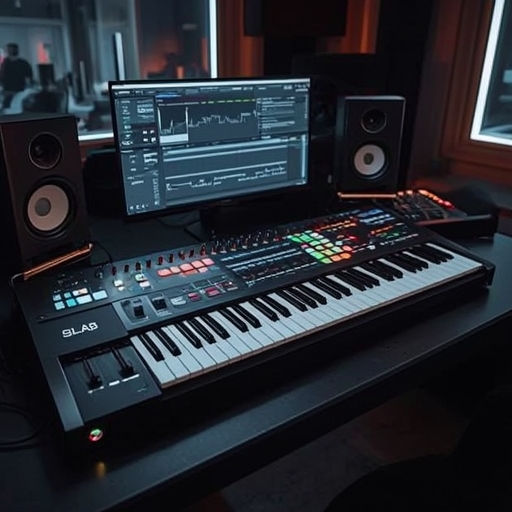
From a design perspective, Slab unmistakably echoes Maschine’s aesthetic lineage. The resemblance goes far beyond their shared use of a 4×4 pad grid; it extends to their spatial organization, typography, and even the placement of labels and visual hierarchy of controls. At first glance, one could easily mistake Slab for a Native Instruments product rather than one created by AlphaTheta, Serato’s trusted manufacturing partner. Despite this familiar language of design, the Slab establishes its own identity through thoughtful minimalism. The gray-on-gray palette might not captivate immediately, and under dim studio lighting it can be slightly challenging to read, yet the device’s understated matte finish and clean geometric lines strike a balance between practicality and elegance. Though the chassis is constructed entirely from plastic, it avoids feeling flimsy or cheaply produced. The encoders rotate with reassuring resistance, the buttons depress with a satisfying tactile response, and the large central dial clicks firmly through its detents—an indicator of attention to user experience even within its modest price range. The onboard display, admittedly compact, provides essential visual feedback yet is far from self-contained; users will inevitably rely on their computer screens for composition. This trade-off aligns perfectly with the expectations of equipment in this class, much like competitors such as PreSonus’s Atom SQ or Akai’s MPC Studio.
The Slab’s pads, sensitive to touch and velocity, perform adequately for most tasks, though they lack the superior nuance that has made Akai’s MPC series the recognized leader in pad feel and responsiveness. In everyday use, some subtle inconsistencies emerge, particularly when velocity variations demand precision. Although AlphaTheta advertises adjustable aftertouch among the controller’s features, Serato Studio itself does not currently support aftertouch functionality—a somewhat surprising omission for a DAW in 2025. Nevertheless, the RGB backlighting system on each pad provides immediate visual organization. Producers can easily color-code their chopped samples, assigning shades to categorize elements—such as labeling all kick drums in red—streamlining workflow and offering creative visual feedback that enhances both composition and performance.
The primary dial impresses with its tactile design, offering an appealing resistance that encourages deliberate interaction, although it may not be the fastest tool when exploring expansive sample libraries. In terms of connectivity, Slab reflects its budget-friendly ethos by keeping things simple: a solitary USB-C port establishes the link between controller and computer. There are no built-in audio interfaces, MIDI outputs, or extra expansion options like those found on the more advanced Maschine or Push models. For users prioritizing an uncomplicated setup, this minimalist design will feel refreshingly direct rather than restrictive.
What ultimately defines Slab’s value, however, is its relationship with Serato Studio itself. Integration between the two is impressively intuitive. For most essential functions of the DAW—pattern sequencing, sample triggering, and browsing—the necessary controls are readily accessible on the device. Even as a relative newcomer to Serato Studio, a user can quickly grasp the fundamentals, sequencing rhythmic patterns or laying down basslines in minutes. The acclaimed stem-separation functionality, first made popular in Serato Sample, is also easily reachable, providing powerful sound manipulation directly from the hardware. Users can browse their sample libraries, trigger plugins, and manage creative elements largely without touching the mouse or keyboard, though those with especially large libraries may still prefer traditional mouse navigation for efficiency.
In practical use, crafting beats with the Slab evokes the satisfying immediacy that only physical hardware can provide. Bringing in a drum break, chopping it, and rapidly transforming it into a new rhythm becomes an engaging, almost playful process. Within mere hours, even new users can generate full, if rough, compositions. The difference lies in tactile immersion; tasks that once felt sterile on-screen gain a sense of momentum when performed through pads and knobs. This hands-on dimension revitalizes the creative process, echoing why so many producers still prize physical controllers in an increasingly digital workflow.
Slab also caters to performance-oriented producers by offering direct access to several expressive effects, such as a pitched looper and wah filter. Although these tools don’t reach the same depth as those found on dedicated performance samplers like Roland’s SP-404 or devices from Teenage Engineering, they nonetheless provide valuable ways to add energy and character to live jams or studio sessions.
Where Slab stumbles slightly is in its navigation system and mode management. Each functional layer—the pads, encoders, touchstrip, and dial—possesses its own operational mode, occasionally creating confusion for users transitioning between parameters. Without extensive visual feedback, determining the current mode or adjusting settings such as note repeat rates can be cumbersome. Veteran Serato Studio users may more easily adapt, but newer producers could find themselves momentarily lost within the layered control scheme. Despite Serato Studio’s generally straightforward nature, which emphasizes drum programming and sample manipulation rather than deep modular synthesis, Slab introduces a level of menu-diving that can momentarily disrupt the creative flow.
Furthermore, while Serato Studio accommodates third-party VST and AU instruments, Slab’s dedicated controls for external plugins remain limited, restricting how deeply users can interact with their favorite software synthesizers directly from the hardware. These limitations, while notable, are balanced by the controller’s price point and its targeted role: to offer Serato Studio users a tactile entry into hardware-driven production without overwhelming them with complexity.
Ultimately, Slab is less about converting new producers to Serato Studio and more about enriching the experience for those already within the ecosystem. It delivers an affordable path to the kind of hands-on control typically reserved for higher-end setups—an appealing proposition for any Serato user who has looked enviously at Maschine or MPC owners. While it may not revolutionize the industry, the Slab succeeds in its primary mission: making beatmaking within Serato Studio more immediate, intuitive, and, perhaps most importantly, truly enjoyable.
Sourse: https://www.theverge.com/tech/839732/serato-slab-midi-controller-studio